For teachers
Cognitive offloading & AI: what teachers can do
Students have always offloaded some of their thinking. They write notes so they don't have to remember everything, and they use a calculator so they don't have to do long division by hand. That's cognitive offloading: handing part of the mental work to a tool. On its own it isn't a problem, and a lot of the time it's sensible.
What's different with AI
A calculator takes the arithmetic and leaves the student with the reasoning. AI can take the reasoning as well. Ask it to plan an essay, weigh up two arguments or work out what a question is really asking, and it will do all three. Those are usually the things the task was set to build.
The research is starting to show the cost. In a field experiment with nearly a thousand high school maths students, those given open access to GPT-4 did better on practice problems, but once the tool was taken away they scored 17% lower than students who never had it. A version built to guide rather than give answers largely avoided that drop (Bastani et al., 2025). A survey of 666 people found that heavier AI use went with weaker critical thinking, linked through more cognitive offloading, and the pattern was strongest in younger participants (Gerlich, 2025). It's a survey, so it can't prove cause, though it points the same way as the maths experiment.
What it looks like in your classroom
I call this the vending machine. The student presses the button and gets the result. What comes back can look fine, often better than fine, and a finished essay looks the same whether the thinking happened or not. That's why so many schools I work with are trying to work out whether a piece of work was written by a student or by AI. I think that's the wrong question. What we can see, if we plan for it, is the process: what a student checked, what they rejected, and what they can defend.
Why banning AI doesn't last
Banning AI, or pulling the task, fixes the problem for a term. Students still have the tool at home, and next term the same task is open to the same shortcut. What lasts is changing how the task is designed.
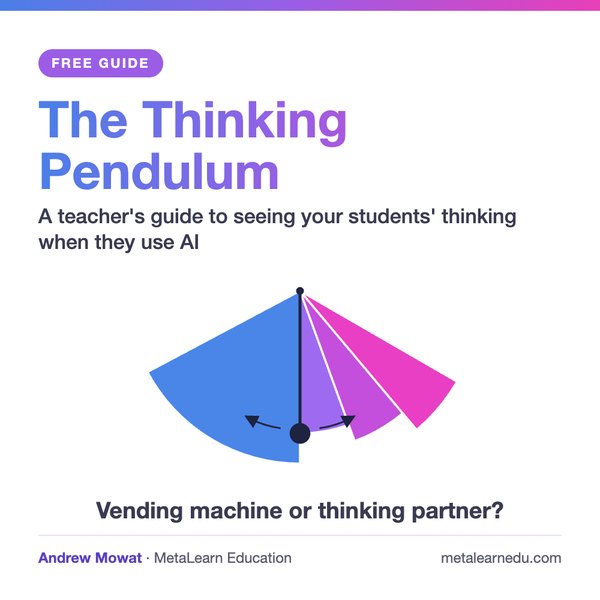
The Thinking Pendulum
When a student uses AI, their thinking sits in one of two modes.
Mode 1, the vending machine. Press the button, get the result. This is fine if the thinking has already been done. Often, though, very little thinking has happened before the button is pressed.
Mode 2, the thinking partner. AI is used to push the student's own thinking. It has three zones:
- Sense checking: is this answer right?
- Outcome determining: the problem is known, the solution isn't.
- Problem shaping: the problem itself is still unclear.
Quick answers have their place. An experienced thinker moves fast because the checking and choosing were done earlier. Students can speed up the thinking, but they can't skip it, and the real skill is choosing the right mode for the moment.
What you can do this term
Before you set a task, ask one question: what's unknown to the student? The answer tells you where the thinking will swing.
Then write the brief stage by stage. For each stage, say whether AI is allowed, and ask students to add one line saying what AI did. It costs you nothing, because you're writing the brief anyway.
When that's working, ask students to keep a short prompt log with a keep or reject note against each AI response, and put 10 to 20% of the grade on the process. Now the thinking leaves evidence you can mark.
Questions teachers ask
Is all cognitive offloading bad?
No. Mode 1 is fine when the thinking has already been done. Ask students to declare it, so you know which parts of the work are theirs.
How do I know which mode a student is in?
You can't tell from the finished work. You can tell from the evidence the task asks for: a question reframed in their own words, a keep or reject log, three options with one chosen.
Do I need to change how I teach?
No. Both steps work in a unit you're already planning.